Yellow Sheet Genie

Demographics, benefits, and clinical details — all on one sheet. Your front desk works faster, your providers walk in prepared.

The yellow sheet, automated.

In eyecare practices, a patient's visit touches many hands — front desk, tech, doctor, optical, check-out. At each handoff, the team needs the same thing: a quick snapshot of who this patient is, what they're here for, and what their benefits cover.

At Arbor Eyecare, that snapshot lives on a literal yellow sheet of paper. It travels with the patient through every stage of their visit — a place to jot notes, flag details, and keep everyone on the same page.

Building those sheets by hand means toggling between screens, copying demographics, looking up benefits, and typing it all out. For a full day of patients, it can take an hour or more.

Yellow Sheet Genie works alongside your front desk as they process authorizations for upcoming appointments. It pulls the data they're already looking at and assembles the prep sheet automatically — so providers have demographics, financials, and clinical history at their fingertips, and patients get help maximizing their benefits.
How It Works

A Chrome extension that works right inside Eyefinity Encompass. It fits into the authorization workflow your front desk already follows — no extra steps, no new systems.

1

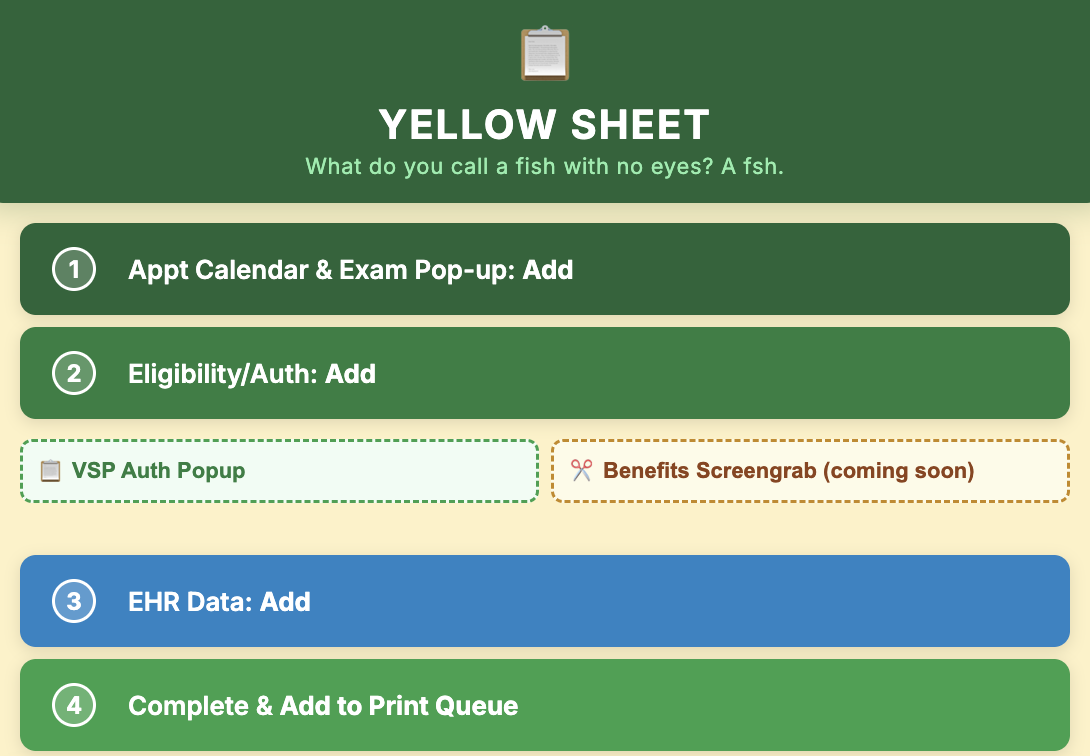
Guided Workflow

Clear, numbered steps walk your team through the process — from pulling appointment data to adding benefits to completing the sheet. No guesswork, no missed steps, even for new staff.

Yellow Sheet Genie side panel showing guided workflow steps
2

Review Panel

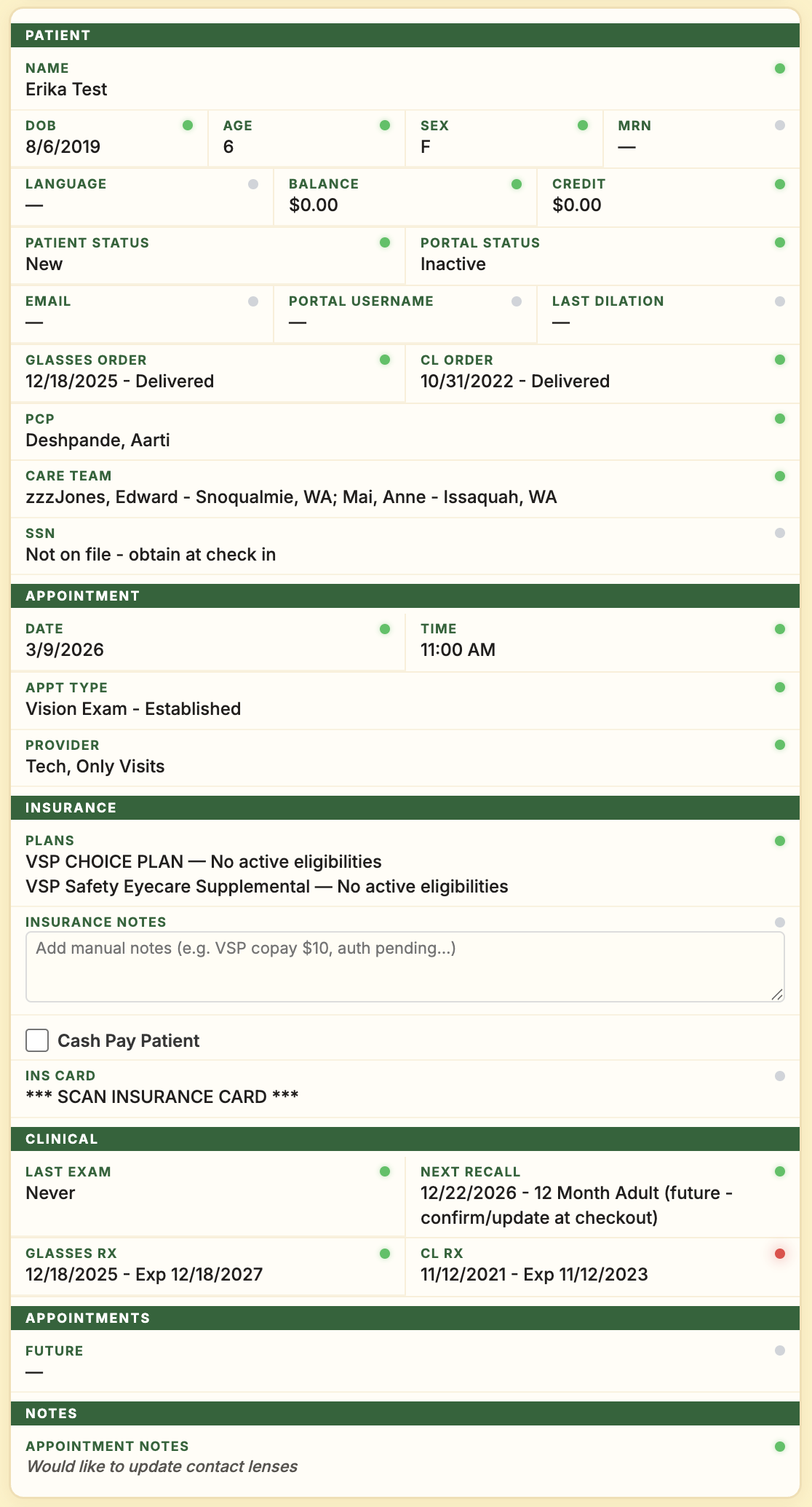
As data is extracted from the EPM and EHR, it appears in the review panel so your team can verify the right information was pulled. Human in the loop — always.

Review panel showing extracted patient demographics, appointment, insurance, and clinical details
3

Batch Queue

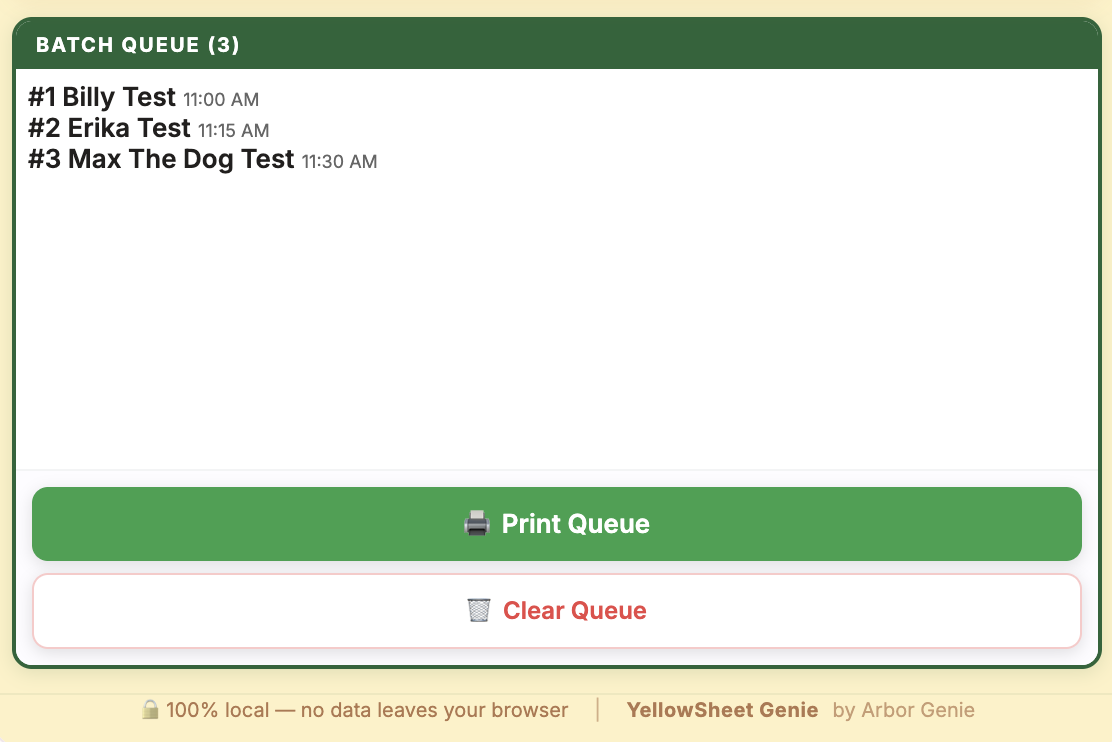
Each patient gets added to a print batch as you go. Perfect for busy front desk staff who get interrupted — you can always see where you left off and move on to the next patient.

Batch queue showing patients ready to print with Print Queue and Clear Queue buttons
4

The Yellow Sheet

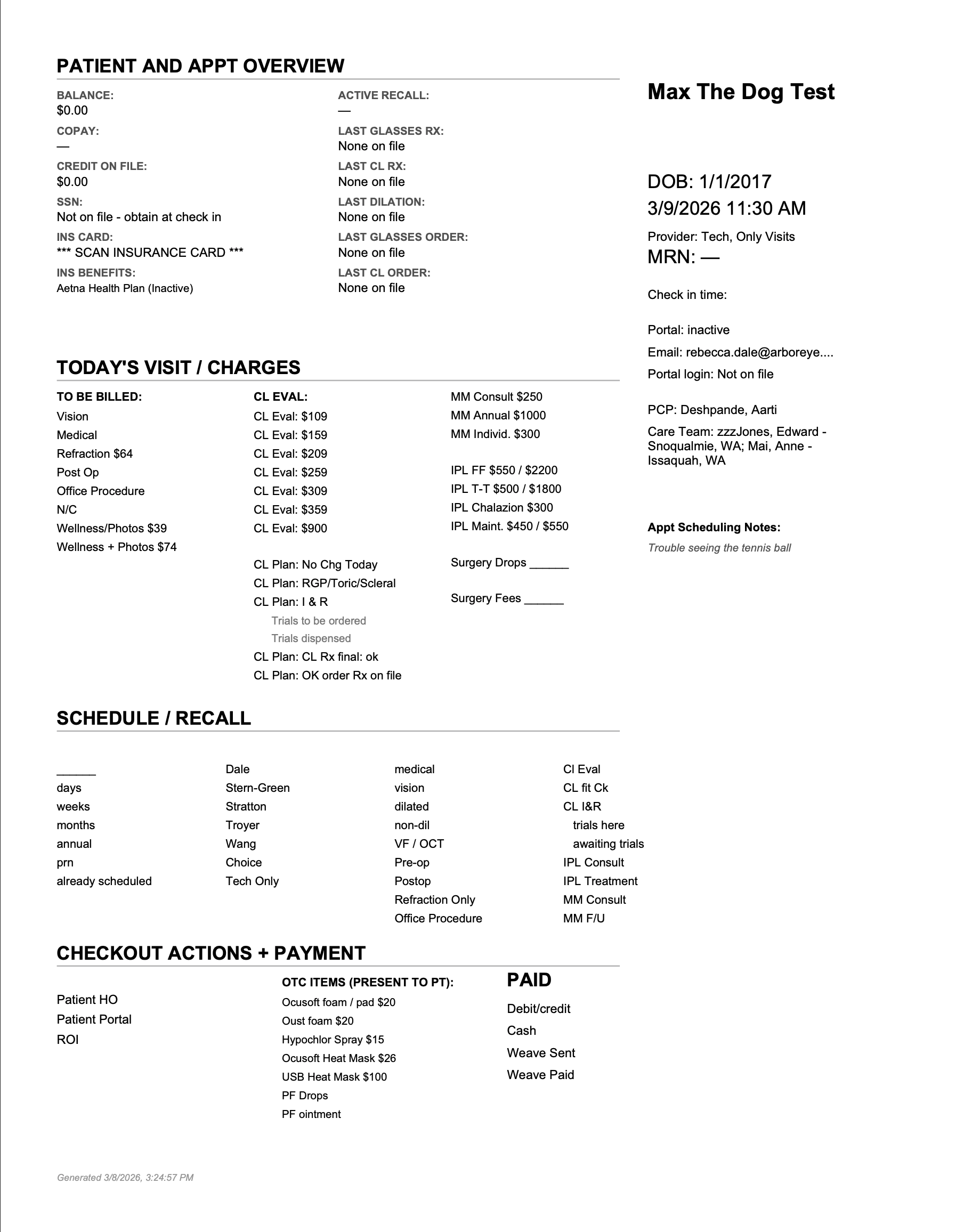
A clean, printed prep sheet with data neatly organized and customized for your office's workflow. At Arbor Eyecare, we print on the same yellow paper we've used for 15 years — the familiar form the whole team knows, now generated in seconds.

Printed yellow sheet with patient demographics, visit charges, scheduling, and checkout sections

What's on the Sheet

Everything the team needs at each stage of the visit — with space to jot notes as the patient moves from front desk to tech to doctor to optical to check-out.

Demographics & Appointment

Patient name, DOB, contact info, appointment details, and insurance — pulled directly from the practice management system.

Benefits & Authorization

Insurance benefits and auth details captured during the front desk's normal authorization workflow. Providers know coverage before the visit starts.

Rx & Order History

Last glasses Rx, last contact lens Rx, last glasses order, and last CL order from your office — all in one place.

Clinical Details

PCP, other providers, last dilated exam, and medical record number — pulled from the EHR so the provider has the full picture.

Built for Handoffs

Retains the feel of a handwritten form — structured for quick notation as the patient moves through each stage of their visit.

Print Queue

Build a batch of prep sheets as you work through authorizations, then print them all at once. Ready for the provider's clipboard.

Privacy & HIPAA Compliance

Yellow Sheet Genie was built for healthcare from day one. Here's exactly how we protect patient data.

100% Local Data Processing

Yellow Sheet Genie runs entirely in your browser. No patient data is ever sent to any external server. There is no cloud component, no database, no analytics — nothing leaves your machine.

  • All data extraction happens locally in your Chrome browser
  • PDF prep sheets are generated client-side using bundled libraries
  • Patient data is stored temporarily in Chrome's local storage and cleared when no longer needed
  • No network requests are made to Arbor Genie or any third-party servers
  • Even fonts are bundled locally — zero external dependencies

PHI Safeguards

The extension handles protected health information (PHI) including patient names, dates of birth, insurance details, and medical record numbers. Built-in safeguards include:

  • SSN masking — Social Security numbers are always displayed as xxx-xx-####. The full number is never shown or stored.
  • Scoped access — The extension only reads data from the EHR and practice management pages it needs to do its job. It does not transmit data to any external servers.
  • No data persistence — Patient data is held in temporary browser storage only while you're building prep sheets. It is not retained long-term.

Chrome Extension Permissions

Transparency matters. Here is every permission the extension requests and why:

Permission What It Does Why It's Needed
activeTab Access the currently open tab when you click the extension Read patient data from the EPM or EHR page you're viewing
scripting Run scripts on the active EHR page Extract structured data from the EHR interface and parse insurance PDFs
storage Save data locally in Chrome Hold patient data temporarily while you build your print queue
sidePanel Open a side panel in Chrome Display the prep sheet interface alongside your EHR

Host Permissions

The extension's host permissions are scoped to only the specific domains it needs to do its job — such as your practice's Eyefinity Encompass pages and insurance portals used during authorization. It cannot access unrelated websites. This is enforced by Chrome at the browser level.

Do I Need a BAA for Yellow Sheet Genie?

No. A Business Associate Agreement is required when a vendor receives, stores, or processes PHI on your behalf. Yellow Sheet Genie never does any of that — all patient data stays on your local workstation. Arbor Genie has no access to your patient data at any point.

This is different from our other product, Fax Genie, which processes fax data through cloud infrastructure and does require a BAA. For Fax Genie, we execute BAAs with every practice we work with.

If your compliance team has questions about Yellow Sheet Genie's architecture, we're happy to walk them through it. The extension's source code is also available for review on request.

Questions? Get in touch.

Interested in Yellow Sheet Genie?

Yellow Sheet Genie was built for our own practice, Arbor Eyecare, and is customized to our workflows. If you're an Eyefinity Encompass practice and want to explore whether we can build something similar for yours, we'd love to talk.

Get in Touch